How to Validate Tax IDs for Shopify B2B Applications
Shopify B2B now comes with most Shopify plans, but it won't tell you whether a wholesale applicant's tax ID is real. Here's how to validate tax IDs before you approve a wholesale account.

Selling wholesale on Shopify used to mean workarounds: a second store, a locked-down collection, a spreadsheet of approved buyers. Shopify B2B changed that. You can now manage companies, locations, catalogs, custom pricing, and payment terms right inside your existing store.
And it's not reserved for the biggest merchants. Shopify B2B is included at no extra cost on Shopify's Basic, Grow, Advanced, and Plus plans, so you don't need Shopify Plus to start selling to businesses. A few features, like unlimited B2B catalogs and deposit payments, are still Plus only.
But once you open the door to wholesale, a new question shows up: who are you letting in?
The gap in the approval process
Say a company sends you a wholesale application. The name looks real, the address checks out, and there's a tax ID in the right field. You approve it and set up net terms.
Three weeks later, you find out the number belonged to a different business. Or it was a personal SSN that happened to look like a company EIN. Or it was a typo nobody caught.
Tax IDs are one of the best signals that a buyer is a legitimate business. They're also one of the easiest things to skip checking, because verifying every number by hand takes time most merchants don't have. Shopify B2B gives you a place to store a tax ID on a company location, and if you use Shopify Tax, it checks EU and UK VAT numbers you enter there. Tax IDs from other countries are stored as entered, and nothing checks the number a buyer gives you when they apply.
That's where Onboard B2B comes in.
What Onboard B2B adds to Shopify B2B
Onboard B2B is an app that builds on top of Shopify B2B. It handles the part that comes before a company shows up in your admin: collecting applications, reviewing them, and approving the right buyers.
With Onboard B2B, you can:
- Collect applications with a form you customize, so buyers can apply for a wholesale account on their own.
- Review and approve in one place, instead of piecing details together from emails.
- Create the company in Shopify B2B automatically once you approve, so your catalogs, pricing, and payment terms are ready to go.
- Validate tax IDs, which is the newest addition and the focus of this post.
Shopify B2B stays the engine. Onboard B2B fills in the features that aren't part of Shopify out of the box.
What tax ID validation checks
When validation is on, each company application is checked as it comes in. For every application you'll see:
- Whether the ID is valid for the applicant's country. More than 100 countries are supported.
- Which format it matched, such as a VAT number or an employer identification number (EIN).
- The registered company name and address, for VAT numbers in most EU countries, the UK, and Australia. These come straight from the government registry.
For those countries, the registered name is compared with the company name the applicant entered. Harmless differences like "Ltd" versus "Limited," or "Acme Widgets" versus "ACME WIDGETS PTY LTD," are ignored, so you don't get false alarms over formatting.
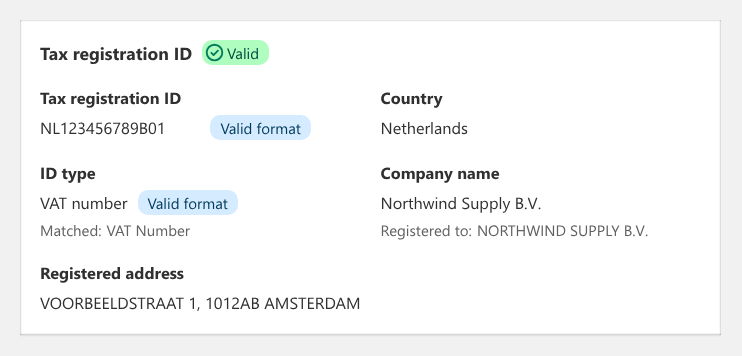
Example application with sample data.
What the badges mean
Every application gets a status badge, so you can scan a list and know where to look:
| Badge | What it means |
|---|---|
| Valid | The number is well formed and the registered name matches the application |
| Format valid | The number is well formed, but there's no registry to confirm who owns it |
| Partial match | The number is registered, but the name only partly matches |
| Name mismatch | The number is registered to a different company |
| Invalid | The number isn't a valid format |
| Not validated | A check couldn't be completed, for example when the country isn't supported |
A few of these deserve a closer look.
Format valid is not the same as verified. Most countries, including the US, don't have a public registry that can confirm who a number belongs to. In those cases you'll see "Format valid," which means the number is shaped correctly and nothing more. We'd rather be upfront about that than show a green check that promises too much.
Name mismatch is the one to watch. A well-formed number registered to an unrelated company looks fine at a glance, which is exactly why it's risky. Onboard B2B shows a warning on the approve page, right when you're making the decision.

Example warning with sample data.
Country differences get flagged too. If the tax ID's country differs from the shipping country, you'll see a heads up. That's often legitimate, like an Irish VAT number on a company that ships to Germany. It's also what a borrowed number can look like, so it's your call.
Catch mistakes before the application is submitted
Validation also runs on the application form in customer accounts, so many problems get fixed before they reach you.
Applicants pick a country and an ID type (VAT number, business tax ID, or individual tax ID), then enter their number. When they leave the field, it's checked. If something's off, they see what went wrong, such as a number that's too short or too long. If the number is valid but written differently than the standard style, they get a hint with the expected format, like 12-3456789 for a US EIN.
The ID type matters more than it seems. Without it, a nine-digit US number can match a personal SSN, an ITIN, or a business EIN, and a B2B form shouldn't accept an SSN. Asking for the type keeps the check honest.
EU customers can also type their VAT number with the country prefix, like NL853746333B01. The prefix is recognized, and the country and ID type are filled in for them.
How to turn on tax ID validation
Tax ID validation is available on every Onboard B2B plan, and it's off until you turn it on. Because tax IDs are sent to a third-party validation service (Tax ID Pro) to be checked, we made it opt-in.
Once Onboard B2B is installed:
- In the app, go to App settings and tools.
- Under Integrations, select Tax ID Pro.
- Click Turn on.
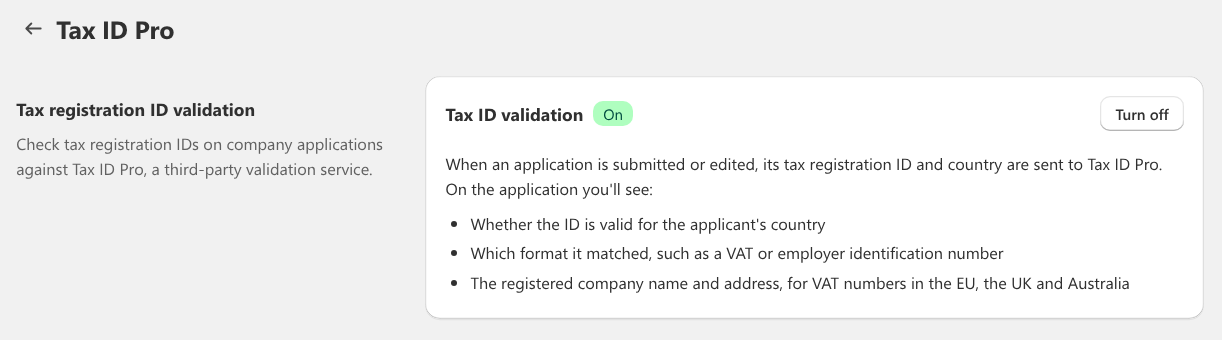
New applications are checked as they come in, and older ones are checked the first time you view them. If you change your mind, click Turn off. Tax IDs stop being sent and results are hidden. Past results are kept, so turning it back on later picks up where you left off.
Require a valid tax ID before submitting
Want to go further? You can block submission when a tax ID is confirmed invalid.
- In the app, go to Forms and select your company application form.
- Select the Tax registration ID field.
- Check Require a valid tax registration ID before submitting.
- Save the form.
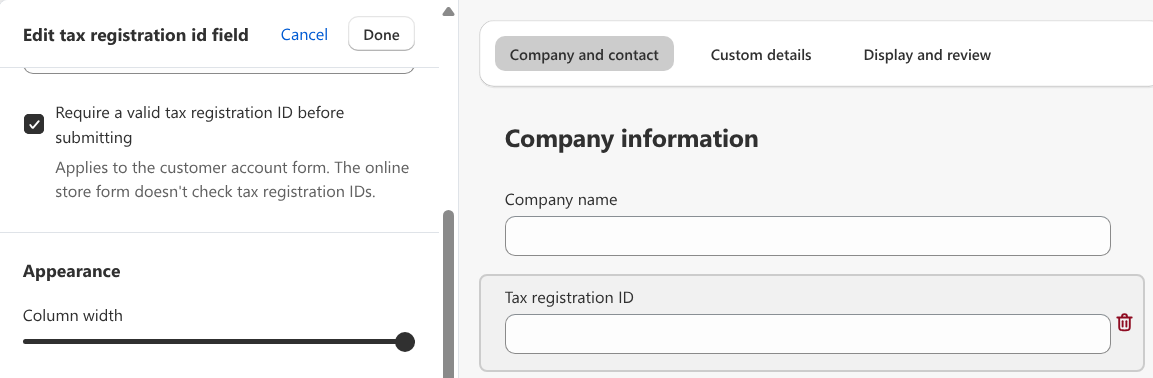
This is off by default, and it only blocks numbers confirmed invalid. If a check can't finish, say the country isn't supported or the service is slow, the applicant can still submit. A technical hiccup should never cost you a real customer.
Note: The checks applicants see while filling in the form, including this option, work on the customer account form. The online store application form doesn't support them yet, though its submissions are still validated once they reach you.
Putting the results to work
- Approve faster when everything lines up. A "Valid" badge with a matching registered name is about as strong a signal as you can get without making a phone call.
- Take a second look at mismatches. Reach out to the applicant or ask for a business license before approving.
- Fix typos on the spot. If an ID is invalid, edit the company details, check the corrected number, and save. A save with an invalid number is rejected, so bad data doesn't slip in.
- Skip the guesswork on international applicants. For most EU, UK, and Australian companies, the registered name and address are right there on the application.
What validation can't do
Validation tells you whether a number is real and, where a registry exists, who it belongs to. It won't tell you whether a company is creditworthy or a good fit for your wholesale program. Treat it as one strong signal in your approval process, not a replacement for it. And a "Not validated" badge doesn't mean something is wrong with the number. It means a verdict wasn't reached.
Get started with Shopify B2B and tax ID validation
Shopify B2B is included on Shopify's Basic, Grow, Advanced, and Plus plans. It isn't available on Shopify Starter. If your store is on one of those four plans, you can start selling wholesale today without changing your Shopify plan. When you're ready to bring in new buyers with less guesswork, install Onboard B2B to collect applications, validate tax IDs, and approve companies straight into Shopify B2B.
Have a question, or an idea for what we should validate next? We'd love to hear it. Get in touch with our team anytime.
Know who you're approving
Collect applications, validate tax IDs, and approve companies straight into Shopify B2B.
